Pocket JavaScript topics.
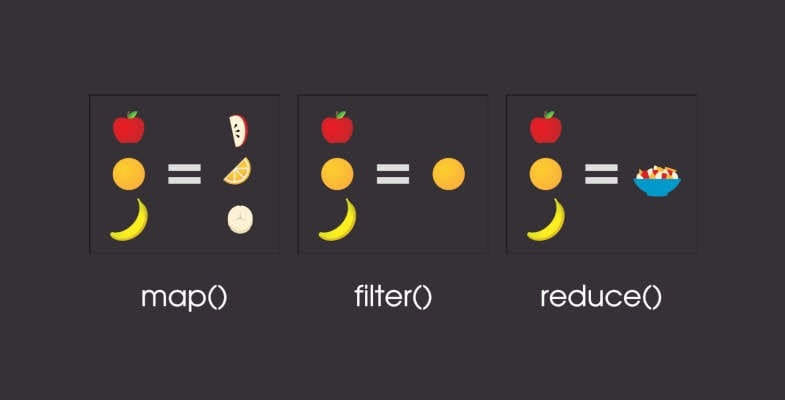
This article contains some information about some little javascript topics such as map, filter, find and reduce. This can be a handy tool for you when needed the most. I have tried to explain these topics in very simple terms.
It will be easy to deal with the filter and find it if you know the map. So, if you found the map a bit longer.
1. Map
simply, It will traverse an array given to it and return a new one according to the thing we have done inside it.
The map() method is a function that creates a new array with the results of calling a provided function on every element in the calling array.
The array elements are traversed from left to right in order, calling the callback function on each element. The syntax is as follows
The array elements are traversed from left to right in order, calling the callback function on each element. The syntax is as follows
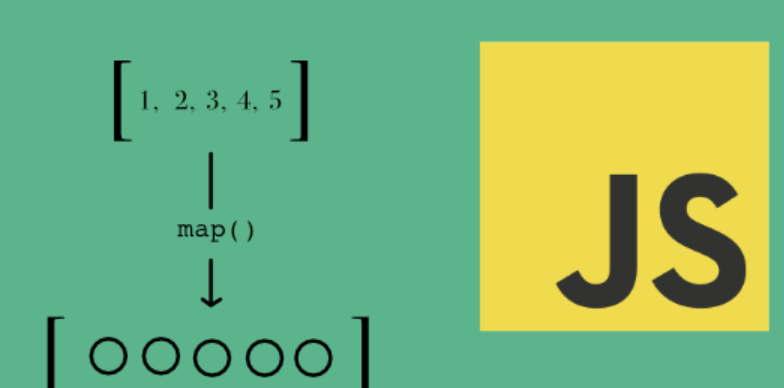
array.map(callback(value,index,arr), thisValue)
The callback function has three values as follows. Out of which only the first one is mandatory to pass in the callback function.
Value:- Value of current element.
index:- Index of the current element.
Array:- The original array where the current element belongs.
Note:- Passing a return in the callback is a must if you don't want your new array to be filled with null.
consider this array of object
const people = [
  {
    name: 'bob',
    age: 20,
    position: 'developer',
  },
  {
    name: 'anna',
    age: 25,
    position: 'designer',
  },
  {
    name: 'susy',
    age: 30,
    position: 'the boss',
  },
  {
    name: 'john',
    age: 26,
    position: 'intern',
  },
];
const getAges = (person) => person.age * 2;
const ages = people.map(getAges);
console.log(ages);

const newPeople = people.map((item) => {
// this item represnts each element of people array.
  return {
// return here is important , if you don't include return then all these propety will become undefined.
    firsName: item.name.toUpperCase(),
// these are new properties being setted by us using properties of people array.
    oldAge: item.age + 20,
  };
});
console.log(newPeople);
- Another example
var square = [1, 2, 3, 4, 5, null].map(value => Math.pow(value,2));

console.log(square); //[1, 4, 9, 16, 25, 0]
example third
  var square = [1, 2, 3, 4, 5];
  delete square[4]; // delete the element 5

  square.map((value, idx) => {
      console.log('index', idx);
      return Math.pow(value,2)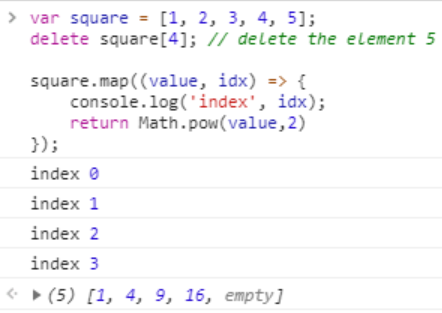
Last example
  var plural = ['Mango', 'Potato', 'Tomato',].map(function(value){
      return value + this;
  }, 'es');

  console.log(plural);
Now, the new array will be ['Mangoes', 'Potatoes', 'Tomatoes',]
But this is the point to be noted that map() the method itself does not change the array on which it is invoked.
2. Filter
- Like map() filter also traverse the given array for each element. However, there are some differences between them these are as follows.
filter() method returns a new array.
As the name suggested we filter some elements and then add them to the new array.
As we are filtering elements, we may affect the size of the new array.
So the size of the new array will equal or less than the previous array.
filter() method creates a new array.
If we don't use any condition then both the filter and map will work the same.
const people = [
  { name: 'bob', age: 20, position: 'developer' },
  { name: 'peter', age: 25, position: 'designer' },
  { name: 'susy', age: 30, position: 'the boss' },
  { name: 'anna', age: 35, position: 'intern' },
];
// filter
// if we don't apply any condition filter and map both will work same
const youngPeople = people.filter((person) => { this person //parameter will work for number of elements in people . like an iterator
  return person.age <= 25; // this will store not true or false in youngePeople.
  // instead it will check if this perosn's age is <=25 then store/ return it to youngePeople
});
console.log(youngPeople);
//[ { name: 'bob', age: 20, position: 'developer' },
 // { name: 'peter', age: 25, position: 'designer' }]
3. Find
As the name suggests find, it finds the element in an array and if successfully found, it will return that element at the very same moment and will not move forward to check other elements.
It returns a single instance or object.
And even if there are multiple matches it will return for the first object. or we can say that
find()the method stops searching the array as soon as it finds a match.```javascript const people = [ { name: 'bob', age: 20, position: 'developer' }, { name: 'peter', age: 25, position: 'designer' }, { name: 'susy', age: 30, position: 'the boss' }, { name: 'anna', age: 35, position: 'intern' }, ];
// find
const peter = people.find((person) => person.name === 'peter');
console.log(peter);
// no match
const oldPerson = people.find((person) => person.age > 35);
console.log(oldPerson);
// multiple matches
const randomPerson = people.find((person) => person.age < 35);
console.log(randomPerson);
```
If the
find()the method does not find any element that satisfies the provided testing function, it returnsundefined.And to avoid this undefined we can explicitly pass the default value using or operator.
// no match
const oldPerson = people.find((person) => person.age > 35);
console.log(oldPerson || "No Match Found");
4. Reduce
The reduce() method reduces an array to a single value.
The reduce() method executes the provided function for each array value (from left to right). The return value of the function is stored in the total.
reduce() method does not execute a function for array items without values. Instead, the reduce() method reduces the array to a single value.
The
reduce()the method is often used to transform an array of data, like numbers, strings, or objects, into a single value, like a sum, average, or concatenated string.
// Reduce
// iterates, callback function
// reduces to a single value - number, array, object
// 1st parameter accumlator('acc') - total of all calculations
// 2nd parameter currnet iteration value('curr') - current iteration/value

const staff = [
  { name: 'bob', age: 20, position: 'developer', salary: 100 },
  { name: 'peter', age: 25, position: 'designer', salary: 300 },
  { name: 'susy', age: 30, position: 'the boss', salary: 400 },
  { name: 'anna', age: 35, position: 'intern', salary: 10 },
];

const dailyTotal = staff.reduce((total, person) => {
  // console.log(total);
  // console.log(person.salary);
  console.log(`Total ${total}`);
  console.log(`Current ${person.salary}`);
  total += person.salary;
  return total; // always return total.
}, 0); // this zero is inital value.

console.log(dailyTotal);
- The reduce() method takes an optional second parameter which is the initial value of the accumulator. This value is used as the initial value of the accumulator and the first argument passed to the callback function. If no initial value is provided, the first element of the array is used as the initial value.
const numbers = [50, 40, 30, 20, 10];
const sum = numbers.reduce((acc, curr) => acc + curr, 10);
console.log(sum); // 160
If you find this helpful please share this with your friends and follow for more such blogs. Thank you.
Also If I have done something wrong please let me know in the comments. Am open to any kind of feedback.
